

CASE STUDY
A smarter, AI assisted clinical review system, without removing the clinician from the decision.
MedAxis automates the work around clinical judgment not the clinical judgment itself. AI handles prioritization, evidence discovery, and documentation. The reviewer remains accountable for every verification, decision, override, and final determination.
ROLE
Senior UI/UX Product Designer
TIMELINE
1 Month
PLATFORM
Enterprise Web Application
65%
Faster clinical review workflow
80%
Reduction in manual evidence searching
50%
Fewer unnecessary escalations

AI can prioritize, search, identify, map, highlight, flag, and draft. The reviewer still verifies evidence, evaluates criteria, makes clinical decisions, documents rationale, and approves every submission.
01 / CHALLENGE
Clinical decisions are complex. The information needed to make them is fragmented.
Medical reviewers evaluate time-sensitive authorization requests while navigating extensive clinical documentation, policy requirements, treatment histories, and medical-necessity criteria.
The challenge is not simply accessing information. It is connecting the right evidence to the right requirement, understanding what remains unresolved, and reaching a defensible determination without losing context along the way.
01
Clinical Documentation
Hundreds of pages of patient records may contain the evidence needed for a decision.
02
Policy Criteria
Coverage requirements must be evaluated individually against the clinical record.
03
Evidence Search
Reviewers must locate documentation that supports or conflicts with each criterion.
04
Clinical Judgment
Evidence still has to be interpreted within the patient's clinical context.
05
Determination
Approve · Deny · Override · Escalate
Turn a fragmented review process into one connected, AI assisted workflow without taking the decision out of human hands.
01 / CHALLENGE
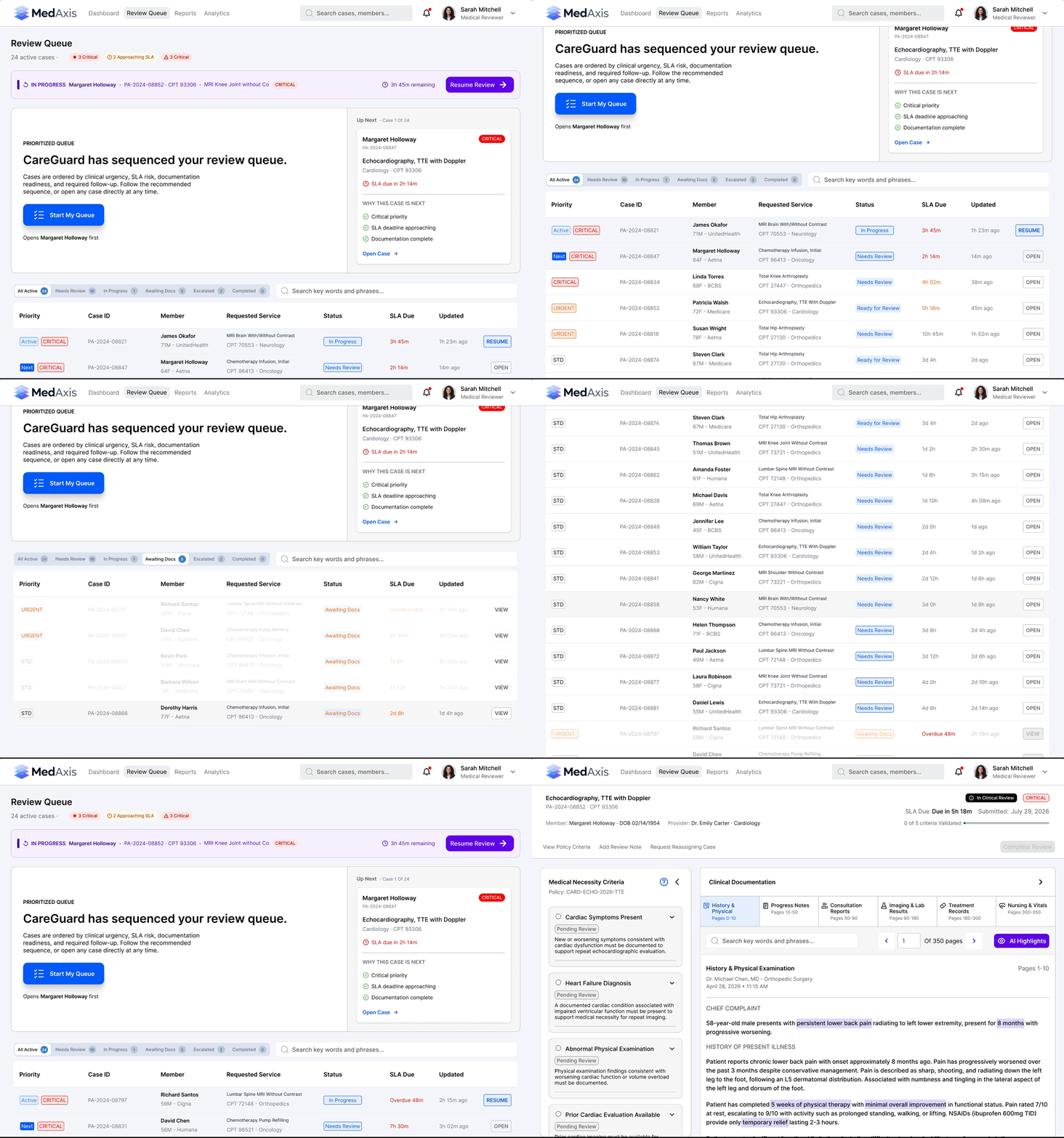
One connected system from case prioritization to determination.
MedAxis reorganizes utilization management around the reviewer's decision-making workflow. Queues, documentation, policy criteria, and determinations are connected into one continuous experience.
01
System Guided Queue
Start My Queue and Resume Review give reviewers a clear entry point into assigned work while preserving access to the complete queue.
02
Visible Case State
Priority, status, SLA timing, and review state remain visible before a case is opened, communicating urgency and readiness at a glance.
04
Filtering Without Losing Context
Cases can be filtered by category and status so reviewers can narrow large workloads without disrupting the underlying workflow.
05
Workload Visibility
Active, completed, awaiting-documentation, and escalated work remain part of the same system rather than becoming disconnected workflows.
03 / AI + CLINICAL REVIEW
AI does the heavy lifting.
The reviewer remains accountable.
MedAxis uses AI to surface relevant evidence, flag potential issues, and reduce manual searching while keeping verification, interpretation, and clinical decisions in the reviewer’s hands.
01
Medical Necessity Criteria
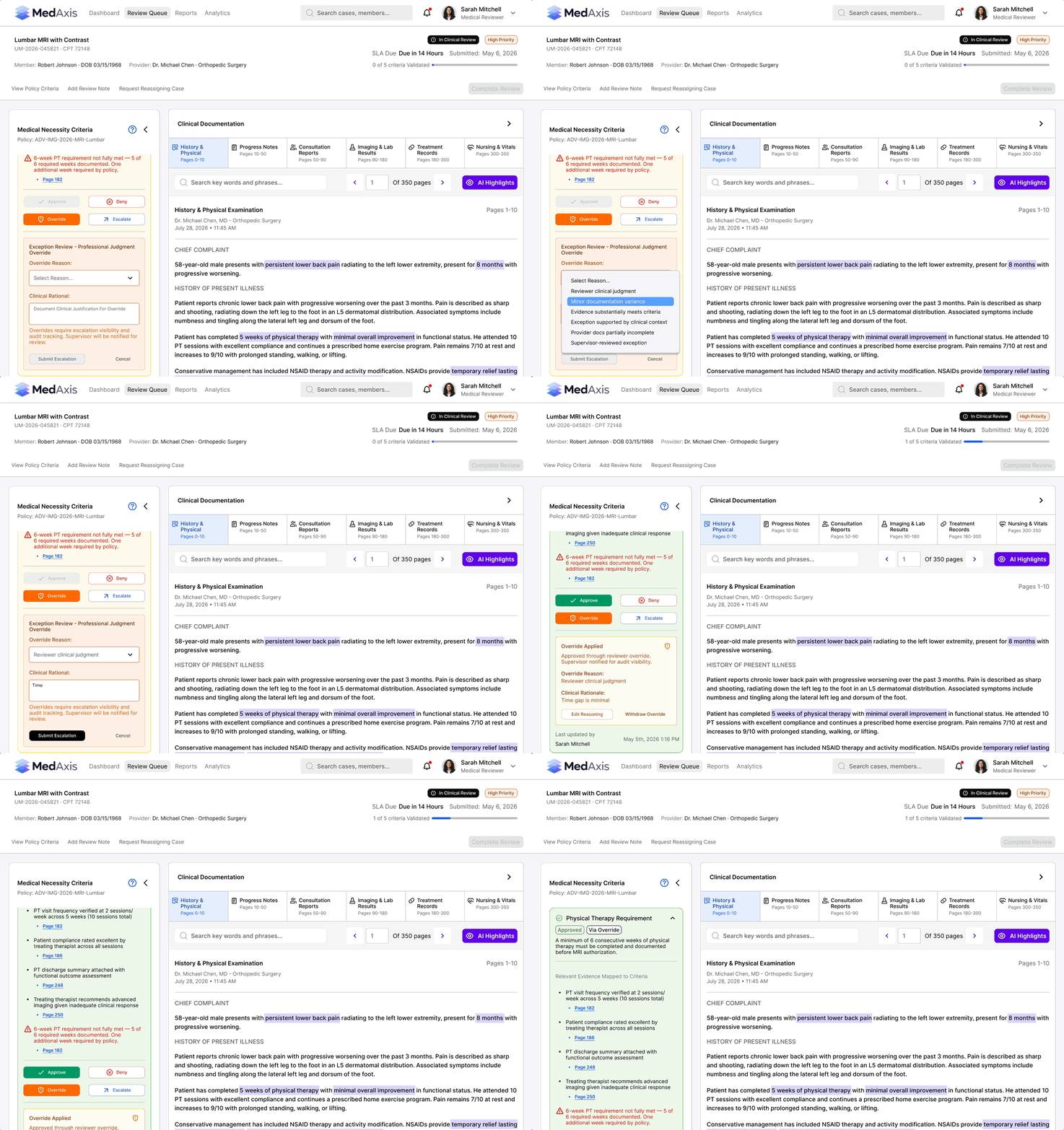
Policy requirements are separated into individually reviewable criteria, allowing reviewers to evaluate complex coverage rules without treating the case as one undifferentiated decision.
02
AI Mapped Evidence
Relevant clinical evidence is surfaced beneath the criterion it may support, reducing the need to repeatedly search through lengthy medical records.
03
Source Page References
Mapped evidence links back to its source location so AI output can be verified rather than accepted without review.

04
AI Highlights
Supporting passages are highlighted within source documentation, helping reviewers locate the original clinical context without manually scanning the record.
05
Flagged Criteria
Incomplete requirements, policy conflicts, and areas requiring judgment are surfaced rather than silently resolved by the system.
06
Reviewer Actions
Approve · Deny · Override · Escalate
AI FLAGS
REVIEWER RESOLVES
When a requirement is not fully met, AI surfaces the conflict and prevents approval until it is addressed. The reviewer can deny, escalate, or override the criterion. An override requires a documented reason and clinical rationale before submission. Once approved, the criterion updates to “Approved via Override,” preserving how the decision was resolved.
AI identifies the conflict. The reviewer determines how to resolve it.
04 SYSTEM FEEDBACK
The interface changes as the review progresses.
A complex review requires more than presenting information. The system must continuously communicate what has been completed, what remains unresolved, and which actions are currently available.


Progress without memory
A persistent progress indicator communicates how many criteria have been validated and how many remain, reducing reliance on memory.
Preventing premature determinations
The final Complete Review action remains disabled while required criteria are unresolved, preventing incomplete submissions.
Contextual action availability
When a criterion contains a policy conflict, contradictory actions remain unavailable while appropriate paths—Override or Escalate—stay accessible.
An action that reflects the outcome
Once all criteria are reviewed, the CTA becomes active and changes to the specific determination produced—Approve, Recommend Denial, or Escalate Review.
The system constrains contradictory actions without removing clinical judgment. The interface makes both system state and the consequence of the next action explicit before submission.
04/ DECISIONS
Clinical review isn't a happy path.
The same workflow must support straightforward approvals, unmet requirements, policy exceptions, and cases where additional clinical judgment is required. Three cases. Three different outcomes.
CASE 01
REVIEWER APPROVES
When the evidence clearly supports the policy.
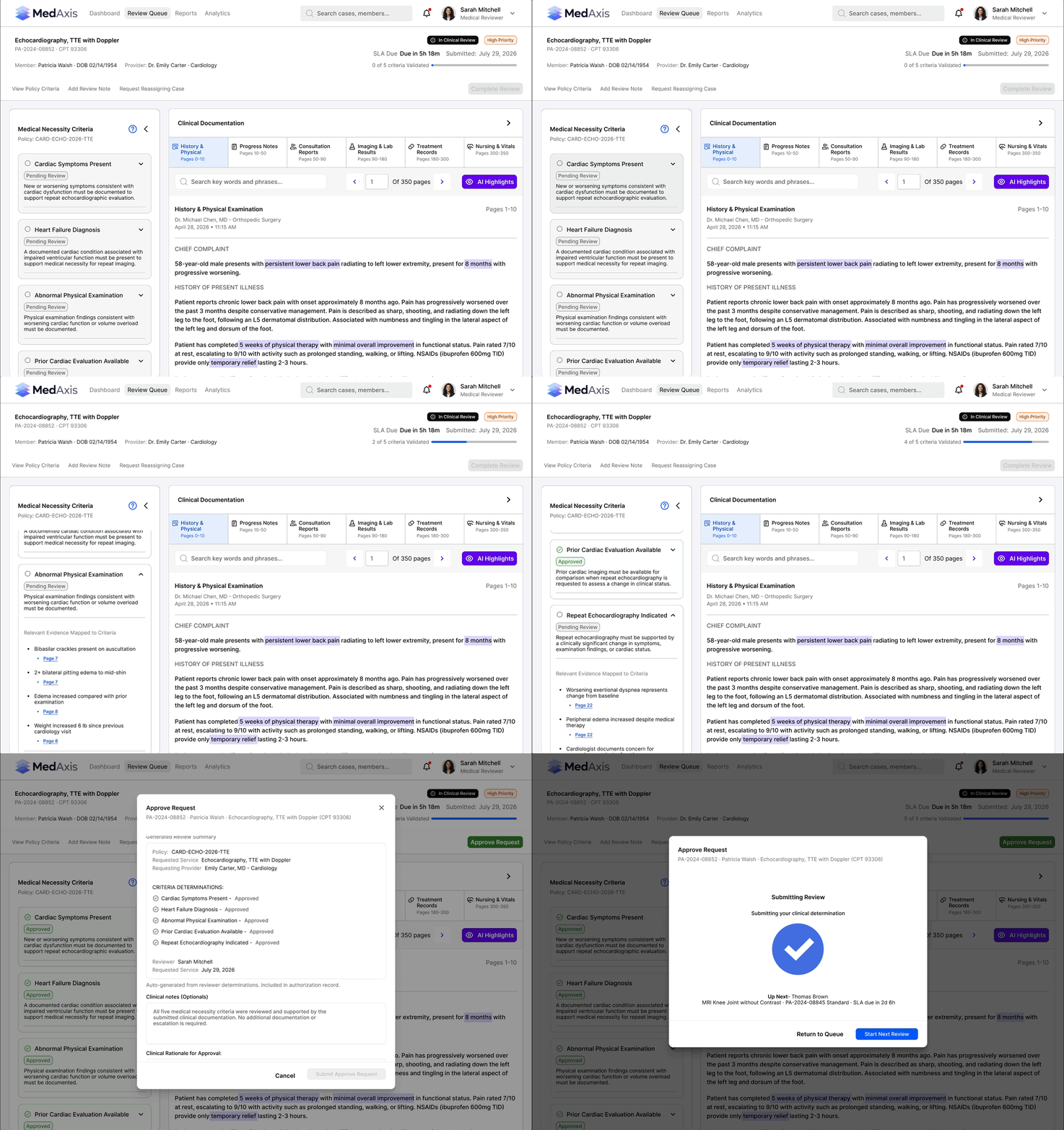
Patricia Walsh
Echocardiography, TTE with Doppler · CPT 93306
5 of 5 criteria supported
Patricia Walsh’s clinical documentation supports all five medical-necessity criteria. As criteria are validated, completed cards can collapse to reduce visual noise while keeping review progress visible. Once every criterion is resolved, the system activates the appropriate final action—here, Approve Request.
Approve Request
CASE 02
DENIAL RECOMMENDATION
When clinical evidence reveals an unmet requirement.
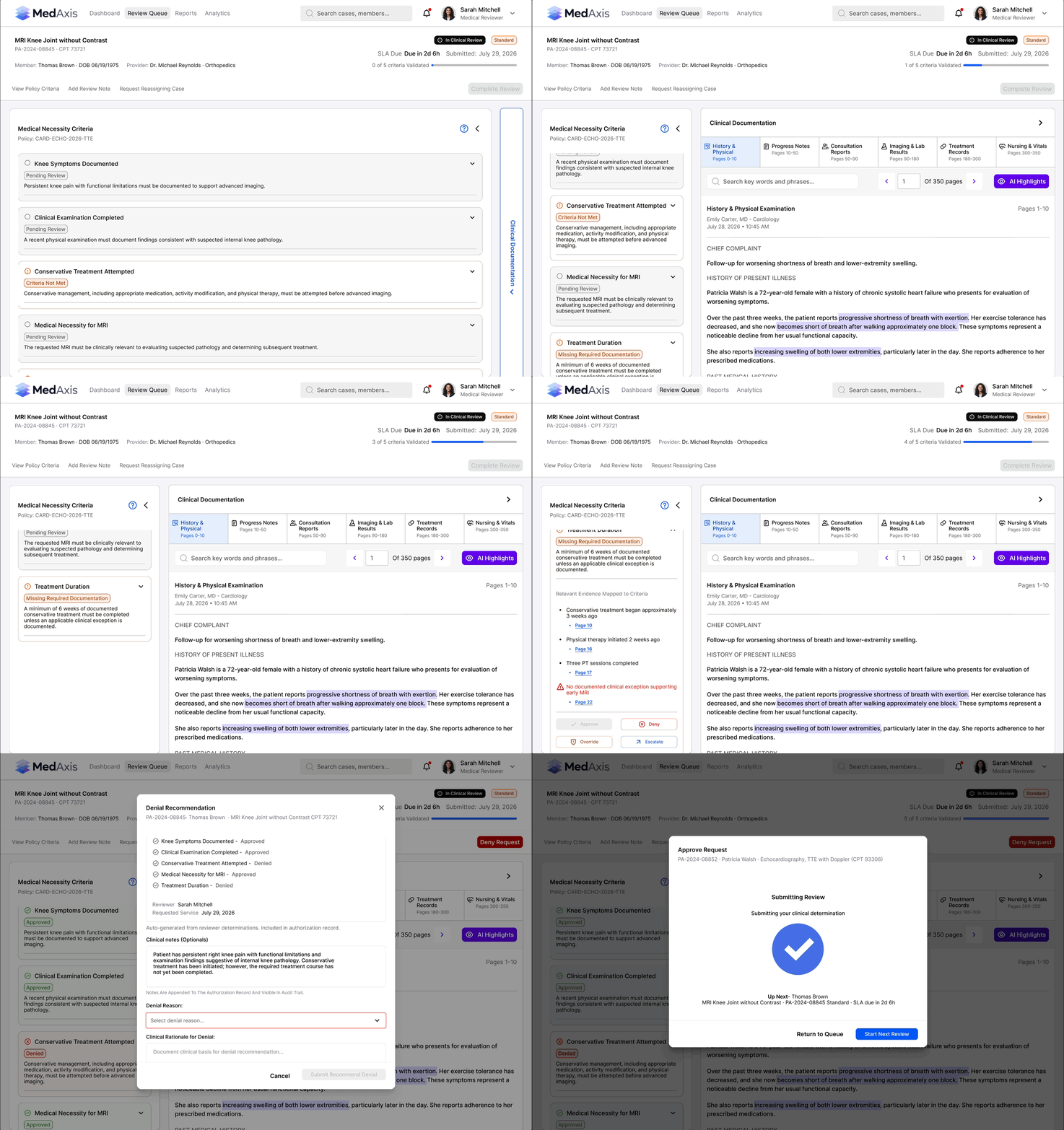
Thomas Brown
MRI Knee Joint without Contrast · CPT 73721
3 of 5 criteria supported
Clinical findings support further evaluation, but only 3 weeks of conservative management are documented where policy requires a minimum of 6 weeks. As criteria are validated, completed cards can collapse to keep the reviewer focused on unresolved requirements.
KEY ISSUES
3 weeks documented · Policy requires 6 weeks minimum
Once all criteria are resolved, the system activates Recommend Denial. The reviewer validates the generated Review Summary, selects the denial reason, documents clinical rationale, and approves the submission.
Recommend Denial
CASE 03
OVERRIDE + ESCALATION
When policy and clinical context don't align perfectly.
Robert Johnson
Lumbar MRI · CPT 72148
Clinical evidence supports advanced imaging, but two criteria require reviewer judgment.
PHYSICAL THERAPY REQUIREMENT
POLICY
6 weeks required
EVIDENCE
5 weeks + progressive neurological findings
REVIEWER
Override criterion
FAILED CONSERVATIVE MANAGEMENT
EVIDENCE
Persistent symptoms despite conservative treatment
UNCERTAINTY
Steroid injection trial not documented
REVIEWER
Escalate for medical director review
The reviewer validates the generated Review Summary, selects the escalation reason, documents clinical rationale, and approves the escalation.
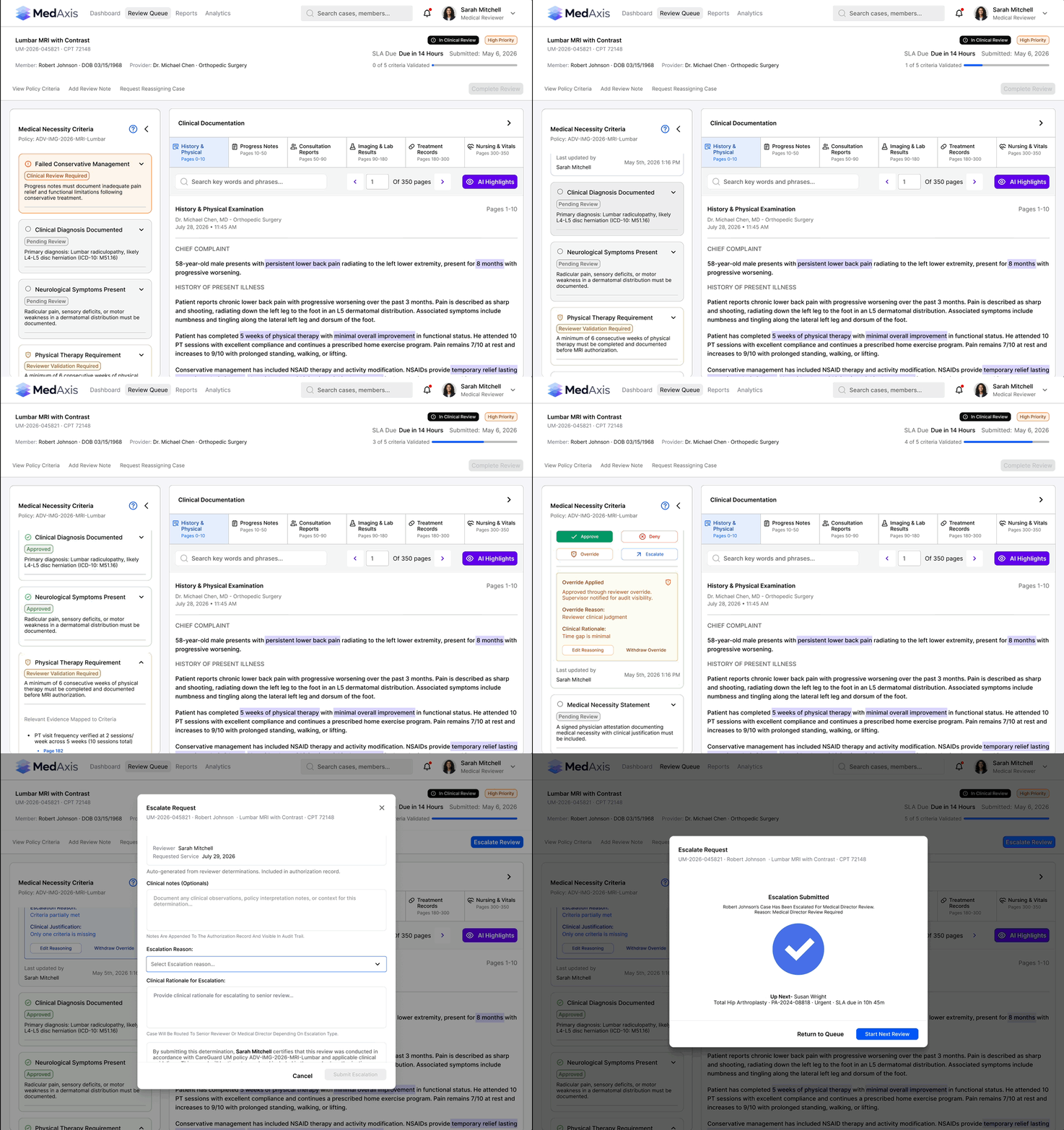
Escalate Review
Not every clinical decision fits neatly into a rule.
The system identifies the conflict. The clinician decides how to resolve it.
REVIEWER EFFICIENCY
Complex reviews without a cluttered workspace.
MedAxis gives reviewers control over information density and keeps critical actions accessible without forcing every piece of information onto the screen at once.
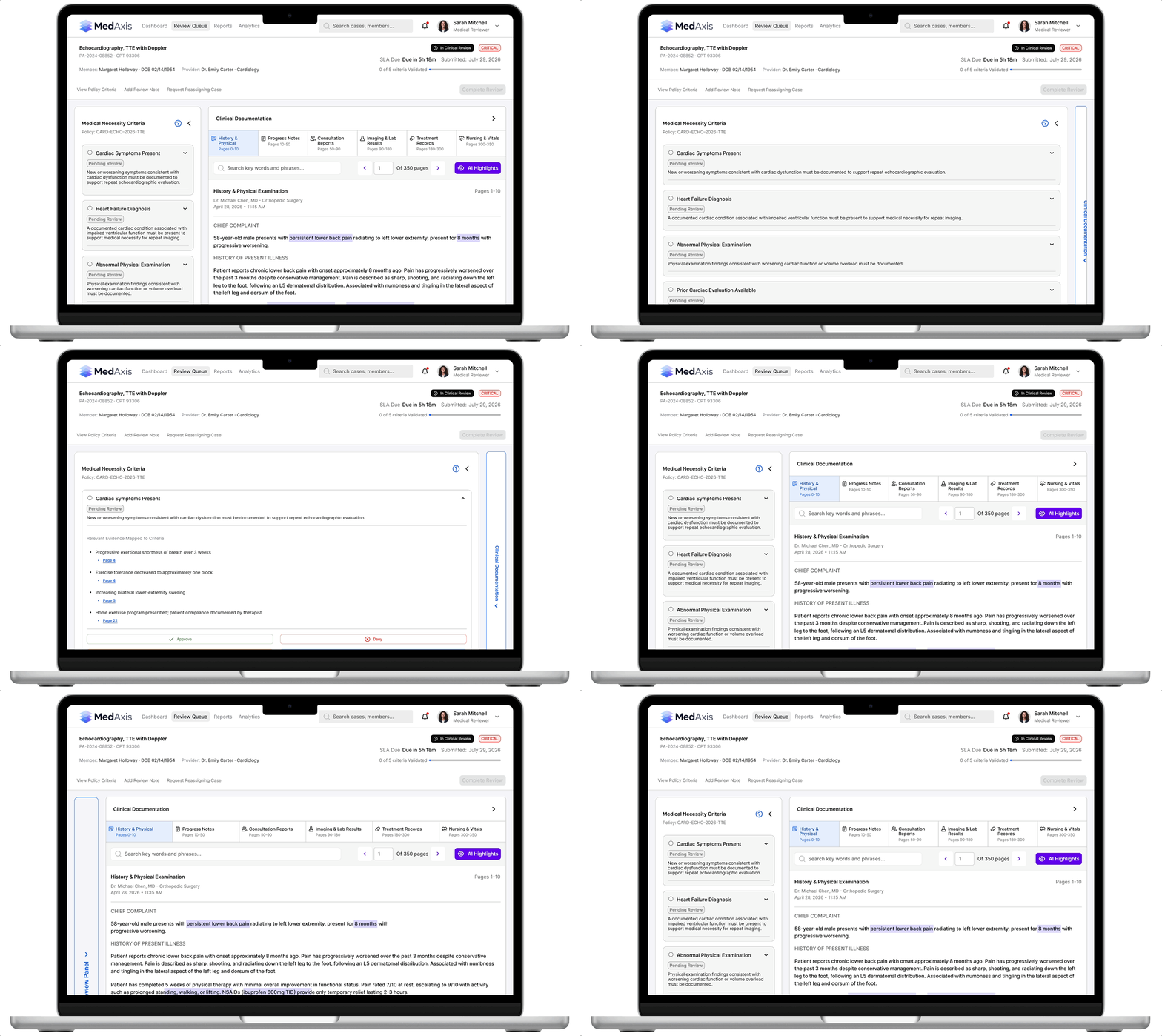
FLEXIBLE WORKSPACE
Criteria and clinical documentation panels collapse independently, giving reviewers more space for the information they need at that moment.
PROGRESSIVE DISCLOSURE
Completed criteria collapse into compact states, reducing visual noise while preserving progress and decision status.
07 / DETERMINATION.
AI can prepare the documentation.
The reviewer owns what gets submitted.
Once the clinical review is complete, MedAxis carries the evidence and review state forward into the determination rather than forcing the reviewer to reconstruct the case from memory.
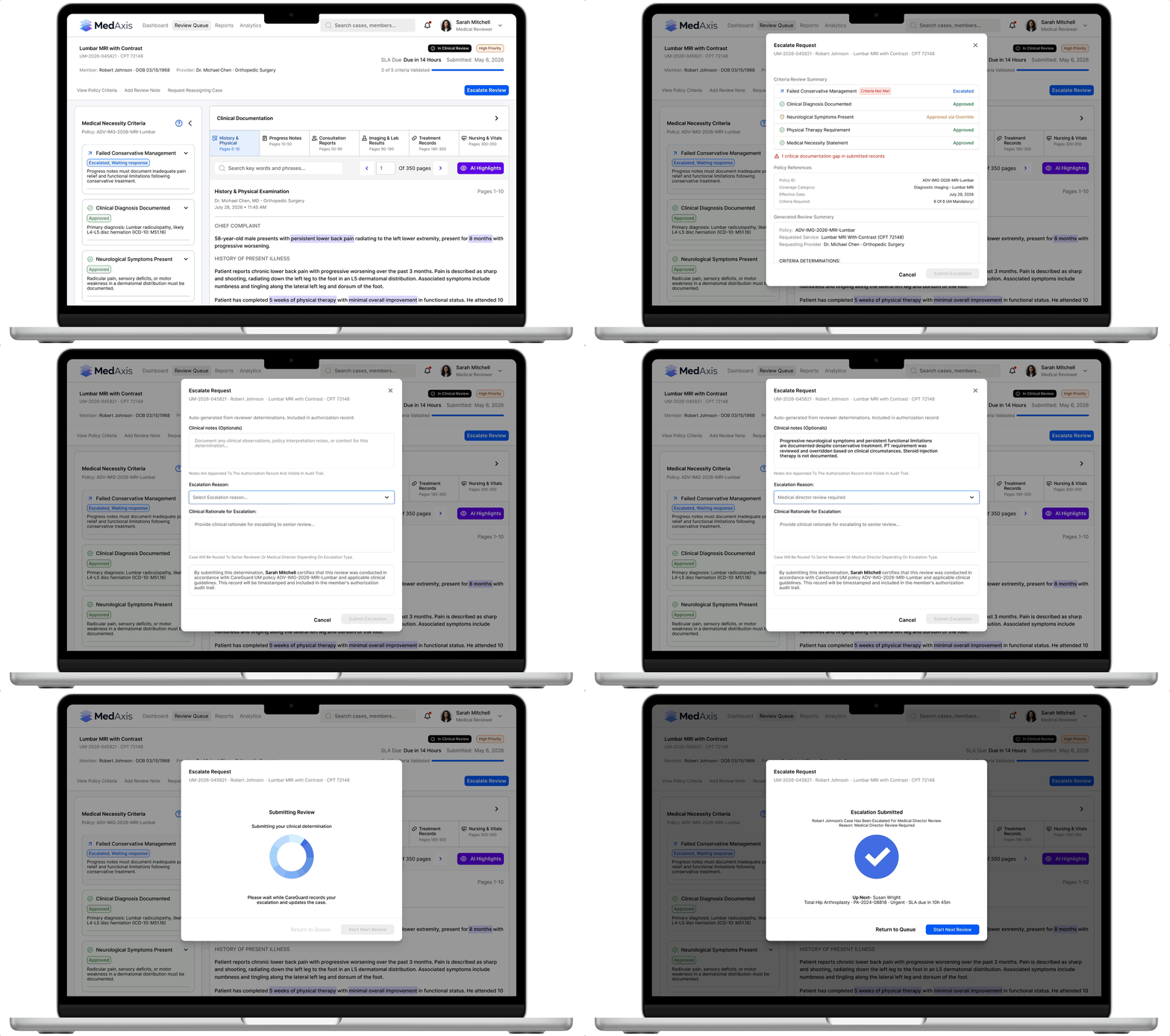
Generated Review Summary
The system assembles the relevant review context into a structured summary based on the work already completed.
Reason Selection
Structured reasons help create consistency while still reflecting the actual determination.
Clinical Rationale
The reviewer documents the clinical reasoning behind the decision, including exceptions or unresolved requirements.
Reviewer Verification
AI-generated documentation remains reviewable and editable before submission. Automation reduces documentation burden without transferring accountability to the system.
08 / CONNECTED OUTCOMES
The workflow stays connected after the decision.
Escalation does not send the case into a disconnected process. MedAxis keeps the review connected as it moves from reviewer judgment to medical-director review, response, and resolution.

Resolution
Queue Updated
Response
Medical Director Review
Escalate

MEDICAL DIRECTOR RESPONSES
Responses surface on the Dashboard so reviewers can see when an escalated case requires attention, who responded, and how the case was resolved.
CASE + QUEUE STATE UPDATES
The medical director’s response updates the case and its criteria, while the new resolution state carries back into the Review Queue keeping the entire workflow synchronized.
RESOLUTION WITHOUT A SEPARATE WORKFLOW
The reviewer can return to the resolved case within the same MedAxis experience, with the decision history and clinical context preserved.
09 / ANALYTICS
Review performance becomes visible over time.
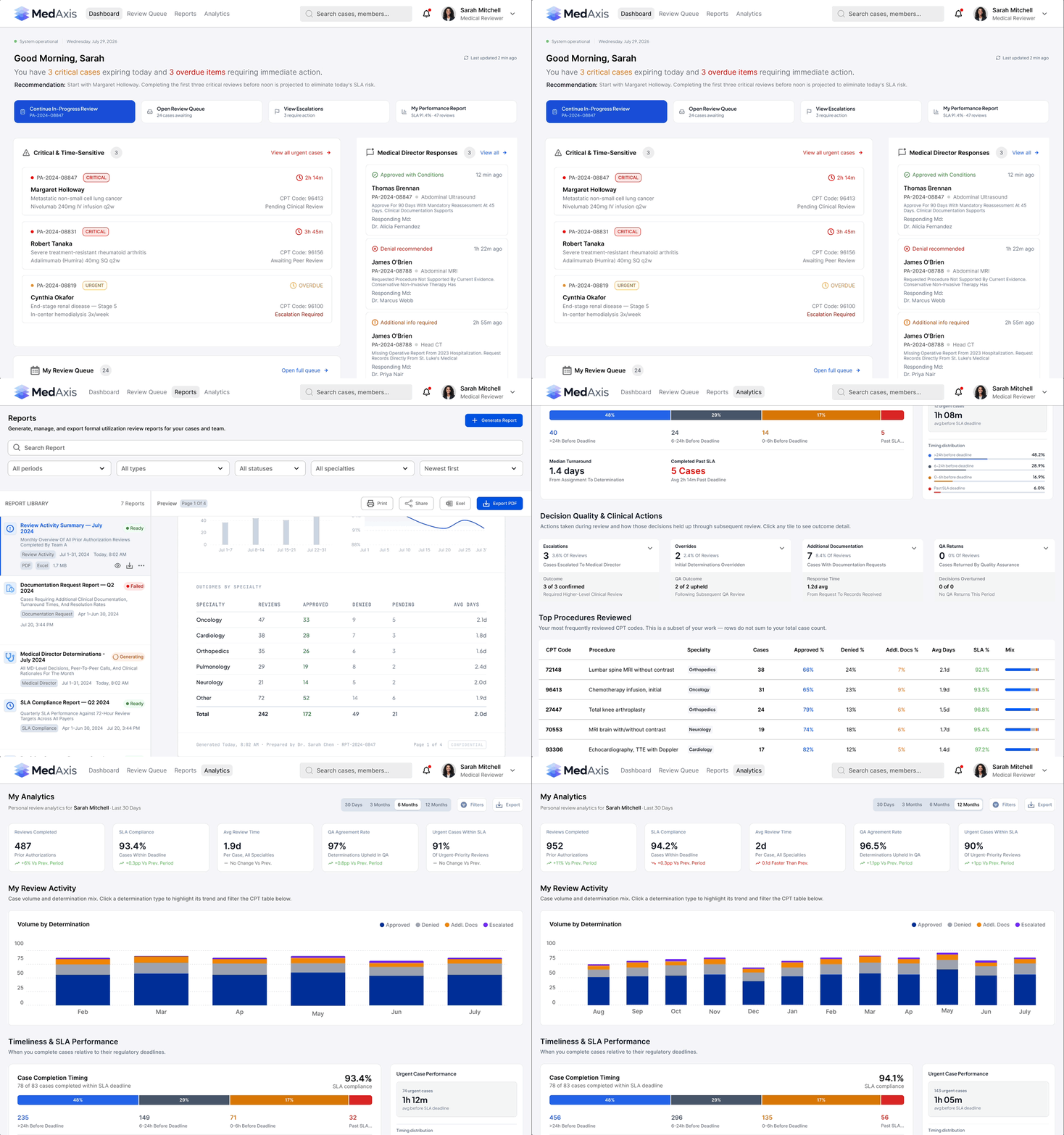
Individual determinations become more useful when reviewers can understand the patterns behind their work. MedAxis Analytics turns review activity into a longitudinal view of performance, outcomes, timeliness, and decision behavior.
Time Range
30 DAYS
3 MONTHS
6 MONTHS
12 MONTHS
Multiple time ranges allow reviewers to move from recent activity to longer-term patterns without changing the underlying analytics experience.


Decision Outcomes
Approval, denial, override, and escalation activity provides visibility into how clinical decisions are distributed across the reviewer's work.
Review Activity
Reviewers can see how their determination activity changes over time rather than evaluating performance from isolated cases.
Timeliness & SLA Performance
Performance data connects clinical review activity with turnaround time and SLA expectations.
Reviewer Trends
Multiple time ranges allow reviewers to move from recent activity to longer-term patterns without changing the underlying analytics experience.
10 / REPORTS
Operational data becomes something teams can use.
Analytics helps reviewers understand performance inside MedAxis. Reports turn that information into structured outputs that can be reviewed, generated, and shared when deeper documentation is needed.
01
REPORT LIBRARY
02
REPORT PREVIEW
03
GENERATE REPORT

Report Library
Existing reports remain accessible from one place, giving reviewers visibility into previously generated operational records.

Report Preview
A report can be reviewed before generation so the reviewer understands what information will be included.

Report Generation
The generation workflow lets the reviewer configure and create the report without leaving the MedAxis reporting experience.
11 / DESIGNING STATES
The product responds to the state of the review.
MedAxis was designed as a system of connected states rather than a collection of static screens. As reviewers make decisions, the interface updates progress, criterion status, available actions, and the final determination path.
STATE 01
Criterion State
Each criterion moves from pending review into a resolved state based on the reviewer's action.
STATE 02
Progress State
Review progress updates as criteria are completed, giving the reviewer persistent visibility into what remains.
STATE 03
Action State
Available actions respond to the clinical and policy state of the criterion. Contradictory or unavailable actions are constrained while appropriate paths remain accessible.
STATE 04
Determination State
Once all required criteria are resolved, the final action becomes available and reflects the resulting determination path.
The interface does not simply display the review.
It responds to it.
Faster, clearer clinical decisions built on a connected system.
MedAxis connects intelligent prioritization, AI-assisted evidence discovery, source verification, policy-guided review, clinical judgment, documentation, escalation, analytics, and reporting within one connected utilization-management platform.
AI reduces the manual work surrounding the decision.
The reviewer remains responsible for the decision itself.
65%
Faster clinical review workflow
80%
Reduction in manual evidence searching
50%
Fewer unnecessary escalations
Faster to navigate.
Easier to verify.
Human at the point of decision.


